

MyRouteOnline is very flexible and almost any addresses and sheet structure can be uploaded and imported to use with MyRouteOnline as there is no specific format required by our route planner.
We recommend that the addresses be as complete and accurate as possible and include a zip-code, as this will help in the planning process and create more efficient routes.
Here are a few Excel examples Make sure the file size does not exceed 5MB:
The address is consolidated into a single field. Labeling the column as “Address” will assist the planner in automatically identifying the field. When you are in the Import Wizard, you can change the headers for Package # and Comments to be “Title” and you will have these details in the output, separated by commas.
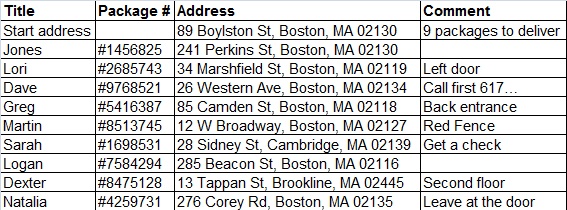
Import Addresses – Excel format – sample 1
The address in this spreadsheet is separated into a number of columns. Each of these columns should be labeled “Address”. In addition, there are two Territories included in this spreadsheet, and should be labeled as such (Territory is an optional field that is explained in a separate user guide.).
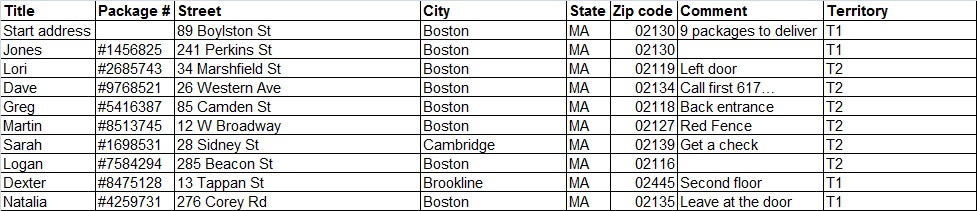
Import Addresses – Excel format – sample 2
This spreadsheet has a Service Time. Please indicate the Service Time in minutes and label the column “Service Time” so the route planner will automatically insert this value into the proper field.
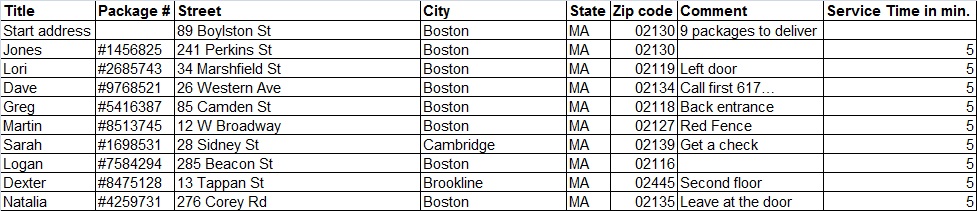
Import Addresses – Excel format – sample 3
+ Find out how to import your address list from Excel.
+ Download Excel Add-in to plan your route.