Routing Parameters
Routing Parameters are located under GOALS tab.
Add your constraints to generate the best route that meets your needs.
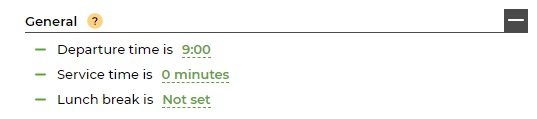
General parameters
- Departure Time
Set the time you want to start your route. Enter a 24-hour value, e.g., 16:30.
The default time is set to 9 AM.
- Service Time located next to each address
Use this parameter to define how long you will stay at each destination.
This may be the same for all destinations or different, and it can be changed after planning your route.
*Departure Time and Service Time can be updated later on if necessary.
- Lunch Break
Enter the duration of your Lunch Break and the time this rest should start and end at.
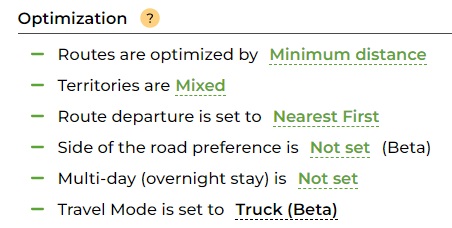
Truck Travel Mode
- Routes are Optimized by Minimum Distance, Minimum Time, Balanced, or Keep Order as is
- Territories are Mixed or Separated
- Route Departure is set to Nearest First or Farthest First
- Side of the road preferences is Not Set, Right side, Left side
- Multi-day is Not set or Hours per day
- Travel Mode is set to Driving, Walking, Cycling or Truck

Units & Preferences
- Distance Units is set to Miles or Km. The default unit is Miles.
- Time Unites is set to am/pm or 24h


