How Do I Track Mileage for Employee Reimbursement?
November 03, 2026
If your employees use their personal vehicles for deliveries, customer visits, service calls, or sales routes, you need a clear, consistent way to account for the miles they drive for work.
The right method depends on how your team works. Some businesses need automatic GPS tracking for every trip. Others, especially delivery, field-service, and sales teams, drive planned multi-stop routes and need a practical way to document that mileage.
This guide covers what counts as reimbursable mileage, the main tracking methods, how to calculate payments, and how route planning can give you a consistent baseline for mileage records.
What Counts as Reimbursable Mileage?
Reimbursable mileage is generally the distance an employee drives for business purposes. This may include:
- Driving between customer locations
- Traveling to job sites or service calls
- Delivering goods or documents
- Visiting clients, prospects, or suppliers
- Driving between business locations
- Attending work-related meetings or events
Commuting from home to a regular workplace is usually not considered reimbursable business mileage. Rules can vary by company policy, employment agreement, and state law.
Before setting up a reimbursement process, make sure your policy clearly defines:
- Which trips qualify
- Which employees are eligible
- What documentation is required
- Which mileage rate will be used
- How often mileage reports are submitted
- Who approves the reports
Common Ways to Track Mileage
The right option depends on whether your team drives planned routes, unpredictable trips, or a mix of both.
Method | How it works | Best for | Main limitation |
| Manual mileage log | Employee records odometer readings or estimated miles | Very small teams with occasional travel | Time-consuming and prone to errors |
| GPS mileage tracker | An app automatically detects and logs trips | Drivers with frequent, unscheduled trips | May raise privacy concerns; does not plan routes |
| Expense software | Employee submits mileage as part of an expense report | Companies already using expense-management tools | Mileage is still self-reported unless paired with another method |
| Route planner with mileage documentation | Business plans multi-stop routes and uses route distance as the mileage baseline | Delivery, service, sales, and field teams | Reflects planned routes; changes during the day need to be reconciled |
For teams that drive predictable routes, such as delivery drivers, technicians, cleaners, sales representatives, or home healthcare visitors, route-based mileage documentation is often the most practical approach.
How to Calculate Mileage Reimbursement
The basic formula is simple:
Business miles × mileage rate = reimbursement amount
For example, say an employee drives 120 business miles in a pay period and your company reimburses at $0.70 per mile:
120 miles × $0.70 = $84
The $0.70 rate here is only an example. Many companies use the IRS standard mileage rate, while others set their own internal rate. The IRS set the 2026 business rate at 72.5 cents per mile, effective January 1, 2026. The IRS can adjust rates during the year, so check irs.gov for the rate currently in effect before updating your policy.
Reimbursement, Taxes, and Accountable Plans
How you structure reimbursement affects how it is taxed. Under an IRS accountable plan, mileage reimbursements are generally not treated as taxable income for the employee, as long as employees substantiate their business mileage within a reasonable time. Records typically include the date, destination, business purpose, and miles driven.
Amounts paid above the IRS standard rate are typically treated as taxable wages. Some states, such as California, also require employers to reimburse employees for necessary business expenses, which can include mileage on personal vehicles.
Tax and labor rules vary, so confirm the details with a tax professional or employment attorney before finalizing your policy.
Using Route Planning to Document Mileage
Many businesses do not need to log every single trip automatically. What they need is a reliable way to know how many miles an employee drove on a planned business route.
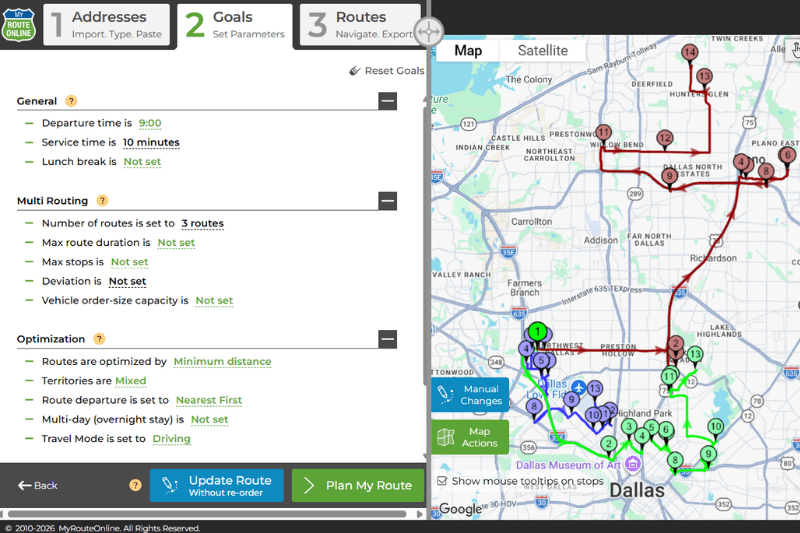
When a dispatcher creates a multi-stop route, route planning software calculates the total distance. That gives the business a consistent, repeatable baseline for each route instead of relying on each driver’s memory or a handwritten log.
A planned route distance is still a plan, not a record of every mile driven. Drivers may skip a stop, add one, return to the depot, or take a detour. To keep records accurate:
- Set the right starting point. If a driver leaves from home, the first leg may count as commuting. Start routes at the depot or first business location, or subtract the commute leg according to your policy.
- Reconcile against what happened. Compare the plan with the stops actually completed and adjust the mileage for added, skipped, or rerouted stops.
- Use the same method for everyone. One calculation method across the team is easier to audit and harder to dispute.
This approach works especially well for delivery routes, home-service routes, sales territories, pharmacy or healthcare visits, equipment-service calls, and recurring customer visits. The same route plan that helps a driver save time and fuel also supports mileage reporting.
Where MyRouteOnline Fits
MyRouteOnline is a multi-stop route planner for deliveries, service visits, and customer appointments. For mileage documentation, it helps you:
- Plan multi-stop routes and see the total route distance
- Save routes online and reload recurring routes
- Export routes to Excel to total distance by driver and period
- Follow stop status in the MyRoute driver app, which helps when reconciling planned routes with completed stops
- Replace driver-by-driver estimates with one consistent calculation method
MyRouteOnline is not an automatic mileage tracker that records every drive in the background. It provides route-based mileage documentation: the planned route distance becomes the starting point for your mileage records, which you then reconcile with what was actually completed.
Example: Reimbursing a Delivery Driver
A delivery driver uses a personal vehicle to complete a planned route with 35 stops. The dispatcher plans the route in MyRouteOnline, starting from the company depot, and the optimized route totals 95 miles.
Over the week, the driver runs five similar routes. At the end of the week, the dispatcher exports the saved routes and confirms that all stops were completed as planned, with no added or skipped stops. The weekly total stays at 475 miles.
At an example rate of $0.70 per mile:
475 miles × $0.70 = $332.50
If the driver had added an unplanned stop or skipped one, the dispatcher would adjust that day’s mileage before approving the report.
Best Practices for a Fair Reimbursement Process
- Create a written mileage policy. Explain which trips qualify, what documentation is required, and how often reports are due.
- Use one consistent method. Whether you use route-based documentation, GPS tracking, or expense reports, apply the same method across the team.
- Keep route records. Saved routes make it easier to verify mileage and resolve questions later.
- Review reports regularly. Check for unusual mileage, missing routes, or duplicated trips.
- Make approval simple. Assign a manager or dispatcher to review and approve mileage reports.
- Separate business and personal driving. This matters most for employees who use personal vehicles.
- Review your mileage rate. Check it against current IRS rates and your company policy at least once a year.
Route Planner or Automatic Mileage Tracker?
Choose the method that matches how your employees actually drive.
An automatic mileage tracker may fit better if:
- Employees make many unscheduled trips
- Drivers frequently mix personal and business travel
- You need every trip logged automatically
- Your team is mostly independent drivers or gig workers
A route planner like MyRouteOnline may fit better if:
- Your team drives planned multi-stop routes
- You manage deliveries, service visits, or sales territories
- You want route efficiency and mileage documentation in one workflow
- You want a consistent baseline instead of driver-by-driver estimates
FAQ about Tracking Mileage
Is commuting mileage reimbursable?
Usually not. Driving from home to a regular workplace is generally treated as commuting, not business mileage. Trips between business locations during the workday typically do qualify. Your company policy and state law determine the details.
Do employers have to use the IRS mileage rate?
No. The IRS standard mileage rate is optional. Many employers use it because reimbursements at or below that rate under an accountable plan are generally not taxable to employees. Amounts above it are typically treated as taxable wages.
Can I use planned route miles for reimbursement?
Planned route distance can serve as a consistent baseline, especially for teams that drive set multi-stop routes. Reconcile it with what was actually completed, and adjust for added stops, skipped stops, or detours before approving the report.
What records should a mileage log include?
A mileage record typically includes the date, the destinations or stops, the business purpose, and the miles driven. Saved routes cover destinations and distance, and your reports can add the date and purpose.
How often should employees submit mileage reports?
Weekly or monthly is common. Shorter periods make it easier to reconcile routes while details are fresh, and accountable plans generally require substantiation within a reasonable time.
The Bottom Line
To track mileage for employee reimbursement, define what counts as business mileage, choose one consistent tracking method, and use a clear reimbursement rate that reflects current rules.
For teams that drive planned routes, a route planner gives you a consistent mileage baseline as part of the work you already do. MyRouteOnline helps you plan the route, save it, and export the distances, so mileage documentation becomes part of dispatch instead of a separate chore.