Your Service Business is Fully Booked But that does Not Mean you Cannot Take More Jobs
May 27, 2026
It is peak season. Your calendar is full. Customers are on a waiting list. New enquiries are coming in daily and you are turning them away because you simply do not have the capacity to take them. Or do you?
Most service businesses, HVAC companies, landscaping crews, pest control operators, cleaning services, plumbers, electricians, are not actually at the limit of what their team can physically do. They are at the limit of what their current schedule allows. Those are not the same thing. And the gap between them is almost always found in the time between jobs, not in the jobs themselves.
The Hidden Cost of Peak Season: Drive Time
A typical field service technician working a full day visits somewhere between 6 and 10 job sites. Between each site, they drive. That drive time is not billable. It does not generate revenue. It does not serve a customer. It is pure operational cost, in fuel, in vehicle wear, and most importantly in time that could have been a job.
For a business running five technicians, each losing an average of 90 minutes a day to inefficient routing, the total is 7.5 hours of wasted productive time per day. That is almost a full technician’s working day, every single day, going nowhere.
At peak season, when demand outstrips supply and customers are waiting weeks for a booking, that 7.5 hours is not an abstraction. It is 3 to 5 jobs you could have completed, invoiced, and collected on.
Why This Happens: The Sequence Problem
The inefficiency almost never comes from technicians driving slowly or taking long breaks. It comes from the sequence in which jobs are assigned.
A dispatcher allocating jobs by hand, or a technician planning their own day from a list, tends to work through addresses in a rough geographic approximation. North side of the city in the morning, south side in the afternoon. It seems logical. But it is almost never optimal.
The difference between a logically sequenced route and a mathematically optimized one is consistently measured at 15 to 30% fewer miles driven per day. For a technician covering 50 miles between jobs in an unoptimized day, that is 7 to 15 miles saved. Multiplied across a team of five, across a five-day week at peak season, the compounding is significant.
More important than the fuel saving is the time saving. Every 15 minutes recovered from drive time between jobs is 15 minutes available for another booking. When labour is your constraint, when you are turning away jobs because there are not enough hours in the day, time between jobs is the only lever you have left to pull.
What Peak Season Looks Like Across 3 Industries
HVAC
Air conditioning demand spikes sharply in late spring and early summer. The same companies that are quiet in February are handling emergency callouts, installation backlogs, and annual maintenance contracts simultaneously by May and June. Technicians are often dispatched reactively, the emergency call that came in at 9am gets added to the morning schedule, throwing off the afternoon sequence.
The specific challenge for HVAC is the mix of job types. A planned maintenance visit takes 45 minutes. An emergency repair might take three hours. Dispatchers building routes by hand cannot easily rebalance the rest of the day around an overrun. Route optimization software handles this in real time, add the emergency, re-optimize the sequence, resend to the technician’s phone in under a minute.
The other HVAC-specific issue is territory overlap. When five technicians each build their own daily schedule, they frequently end up crossing each other’s paths across the city. Territories are not enforced, drives are duplicated, and the same neighborhoods get visited by multiple vans on the same day when a single technician could have covered them in sequence.
Landscaping
Landscaping operations at peak season face a version of this problem amplified by crew size. A landscaping business is not dispatching individual technicians, it is dispatching crews of two to four people, with equipment loaded on vehicles that cannot easily backtrack or divert. The cost of an inefficient routing decision is proportional to the number of people sitting in that van.
A four-person crew spending an extra 30 minutes driving between jobs is costing the business two hours of combined labour time, plus fuel, on a single transit. Over a week of peak season jobs, that is a material number.
Landscaping also has a geographic clustering opportunity that is often underutilized. Customers in the same neighborhood, street, or development can frequently be grouped into the same morning or afternoon block, reducing total transit time dramatically. This is straightforward to see on a map but almost impossible to do consistently by hand across a full week’s worth of bookings.
Pest Control
Pest control has its own timing dynamics. Treatments often need to be scheduled within specific windows, a follow-up visit 14 days after the initial treatment, a seasonal application before a certain date, a reactive callout within 24 hours of a customer report. The scheduling constraints are tighter than in most other field service industries.
What this means in practice is that a pest control dispatcher is not just building an efficient route. They are building an efficient route within a set of time window constraints that changes every day. Manual scheduling under those conditions almost always sacrifices route efficiency in order to meet the time requirements. The jobs get done on time but with unnecessary miles between them.
Route optimization software handles time windows natively. You specify the earliest and latest acceptable arrival time per stop, and the optimizer finds the most efficient sequence that respects every window simultaneously. A dispatcher who previously spent an hour every morning fitting time-constrained jobs around each other by hand completes the same task in under two minutes.
The Capacity Calculation Every Service Business Should Do
Before the next time you turn away a booking because you are fully booked, do this calculation.
Take your number of technicians or crews. Multiply by the number of working days in your peak season. Estimate how many minutes per day each technician currently spends driving between jobs. That number is your lost capacity pool.
If you could recover 25% of that drive time through better routing, how many additional jobs could you complete? At your average job revenue, what does that represent in a week, a month, a season?
For a five-technician HVAC business with each technician covering 8 jobs a day and spending 90 minutes in transit, recovering 25% of that transit time frees up roughly 22 minutes per technician per day. Across five technicians over a 12-week peak season, that is approximately 110 hours of recovered productive time. At an average HVAC job duration of 75 minutes, that is roughly 88 additional jobs you could have completed.
At an average invoice value of $250, that is $22,000 in revenue that was sitting in the routing inefficiency, not in the calendar.
How MyRouteOnline Works for Field Service Teams
The workflow is straightforward and does not require technical knowledge or a long implementation process.
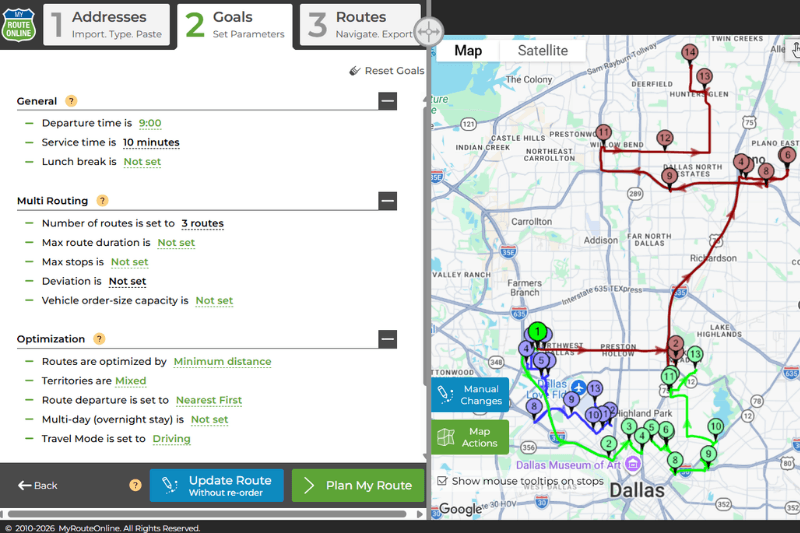
Export your day’s job list from whatever system you use, a scheduling app, a CRM, a simple Excel file, and import it into MyRouteOnline. The import wizard maps your columns automatically. Set the number of technicians or crews, apply any time window constraints per job, and click Plan My Route. All routes for all technicians are generated simultaneously and balanced by workload.
Each technician receives their route on the free MyRoute app on their smartphone. They navigate turn-by-turn, mark each job complete as they go, and the dispatcher sees live progress across the whole team from the web interface. If an emergency comes in mid-morning, add the address, re-optimize the affected route, and resend to the technician’s phone. No phone calls, no confusion, no manual reshuffling.
For businesses with defined service territories, common in pest control and landscaping where recurring customers are clustered geographically, territory assignments can be built into the import file so each technician is automatically routed within their designated zone. This eliminates territory overlap, makes routes more compact, and gives technicians a consistent area they know well.
Plans start at $19 per month. A free trial is available with no credit card required.
The Question Worth Asking Before Next Week’s Schedule
Your busiest month just started. You are booked out. Customers are waiting.
The question is not whether you can hire another technician, hiring takes weeks, good technicians are hard to find at short notice, and peak season does not wait. The question is how much capacity is currently buried in the drive time between the jobs you already have.
For most service businesses running a team of five or more technicians, the answer is enough to add one to two jobs per technician per day without a single new hire, a single extra van, or a single extra hour of anyone’s working day.
That capacity is already in your schedule. It is just not optimized yet.