How to Plan Multi Drop Routes from UK Postcodes
October 29, 2026
MyRouteOnline turns a list of UK postcodes or addresses into optimised multi drop routes. You can plan up to 1,000 stops in a single run, split them across as many drivers as you need, and send each driver their route to navigate with any navigation app installed on their phone, such as Google Maps or Waze. Pricing is based on the number of unique addresses you plan, not the number of drivers, and every plan includes all features.
New accounts get 20 free credits when they register, so you can test a real route before you pay.
How it works in three steps
- Import your stops. Upload postcodes or full addresses from an Excel, CSV or text file, import from Google Drive or Dropbox, type them in, or add them in ChatGPT with the AI Route Planner. See the spreadsheet format guide.
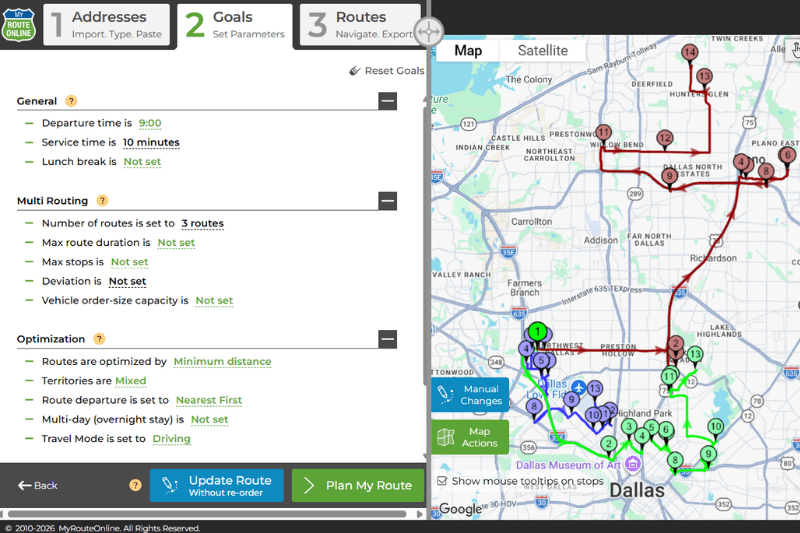
- Set your constraints and optimise. Choose your start and end point, the number of drivers, service time per stop and any time windows. MyRouteOnline calculates the stop order that cuts driving time or distance.
- Send and navigate. Email routes to drivers, export them to Excel, Google Maps, TomTom or Garmin, or open them in the MyRoute app on iPhone or Android.
Planning routes from a list of postcodes
Many UK drivers receive their drops as a list of postcodes. MyRouteOnline accepts postcodes on their own, so you can paste a column of postcodes and plan straight away.
One thing to know: a full UK postcode usually covers a small group of properties rather than a single door. When you plan with postcodes only, each stop is placed at the postcode location. That is accurate enough to get the order of your drops right across a town or a region. If several of your drops share a postcode, or you need the exact order along one street, add the house number or building name to each stop.
Before optimising, MyRouteOnline shows the location it found for each address so you can catch typos or incomplete postcodes. Distances can be shown in miles or kilometres, which you can change under Units & Preferences in the planner.
Multi drop routes for couriers and delivery drivers
Multi drop planning is about more than putting stops in order. These are the settings that matter most for a working delivery day:
- Several drivers at once. Plan routes for your whole team in one run, balance the workload, or set a maximum route duration or number of stops and let the planner split the list into routes.
- Service time. Add a default time per drop, or a different time for specific stops, so the plan reflects time spent at the door and not just driving.
- Time windows. Set the times a customer is available and the route is planned around them. See how to plan with time windows.
- Collections and deliveries. Pair pick-up and drop-off locations so a collection is always visited before its delivery.
- Territories. Assign areas to drivers so each one works the same patch every day.
- Driver app and proof of delivery. Drivers use the MyRoute app with any navigation app installed on their phone, update delivery status and record proof of delivery. The office sees progress in the tracking report, and drivers can send customers arrival notifications.
Who uses it in the UK
- Self-employed couriers and van drivers who get a daily list of drops and want the fastest order before leaving the depot. See route planning for couriers.
- Local shops with their own delivery, such as florists, bakeries and grocers, especially on peak days like Valentine’s Day and Mother’s Day. See florist delivery routes.
- Pharmacies and medical couriers delivering prescriptions and samples to fixed time slots. See medical and pharmacy delivery.
- Charities running collections and donation pick-ups with volunteer drivers. See charity collection routes.
- Tradespeople and field service teams visiting several customer sites a day. See route planning for service providers.
UK driving settings and limits
Routes and directions are built on Google Maps, so they cover England, Scotland, Wales and Northern Ireland.
For vans and lorries, set the driving mode to truck and routes take vehicle height and weight restrictions into account. You can also plan around order size and vehicle volume. See the truck route planning guide.
Routes do not plan around charging zones such as the London Congestion Charge or ULEZ, so check your route against those before setting off.
Is there a free multi drop route planner?
When you register, you get 20 free credits with all features unlocked. One credit covers one unique address, so you can plan a real 20-stop route, try multiple drivers, time windows and the driver app, and see whether the result works for you.
Free tools such as Google Maps are a good fit for a handful of stops: Google Maps allows up to 10 stops per route and keeps them in the order you enter them. A dedicated planner becomes useful once you have more drops than that, need the best order calculated for you, or have more than one driver.
Pricing in pounds
UK customers pay in GBP. You pay for unique addresses (credits), not for drivers or users, and every plan includes every feature. Planning the same address again within 30 days does not use another credit, which helps when you visit the same customers regularly.
You can choose a monthly plan (Basic, Classic or Premium, with 50, 500 or 1,200 credits a month) or a pay-as-you-go pack that stays valid for 12 months, up to 15,000 credits for larger fleets.
Frequently asked questions
Can I plan a route using postcodes only?
Yes. You can import or paste a list of UK postcodes without full addresses. Each stop is placed at its postcode location. If several drops share a postcode or you need the exact order along a street, add house numbers.
How many drops can I plan at once?
Up to 1,000 addresses in a single run, on every plan. You can split them into as many routes and drivers as you need.
Is there a free trial?
Yes. New accounts receive 20 free credits on registration, with all features available. One credit equals one unique address.
Do you charge in pounds?
Yes. UK customers see and pay prices in GBP. Pricing is per unique address, not per driver or user.
Does it work in Scotland, Wales and Northern Ireland?
Yes. MyRouteOnline is built on Google Maps and works anywhere in the UK that Google Maps covers.
How do drivers get their routes?
You can email routes to one or more drivers, export them to Google Maps, TomTom or Garmin, or have drivers open them in the MyRoute app for iPhone and Android, which works with any navigation app installed on their phone, such as Google Maps or Waze.
Does the route avoid low bridges and weight limits?
Yes, when the driving mode is set to truck. Routes then take vehicle height and weight restrictions into account. Charging zones such as the London Congestion Charge and ULEZ are not planned around, so check those before you travel.
Can I plan routes for more than one driver?
Yes. Set the number of drivers, a maximum route duration or a maximum number of stops, and MyRouteOnline divides the list into balanced routes. Every plan includes unlimited users.
Try it with your own postcodes
Register and get 20 free credits with every feature included.