Microsoft Streets and Trips Alternatives: Best Replacements by Use Case
July 13, 2026
Microsoft discontinued Streets and Trips years ago, but people still search for it, because nothing else quite replaced the combination of offline desktop mapping, pushpin routing, and printable routes it offered. The truth is no single tool replaces all of it. The right replacement depends on what you actually used Streets and Trips for.
Best Alternatives by Use Case
The following table compares Microsoft Streets and Trips alternatives by the specific use case each one replaces, from multi-stop business routing to leisure road trips.
| Best For | Software | Platform | Key Strength |
|---|---|---|---|
| Multi-stop delivery and business routing | MyRouteOnline | Web, iOS, Android | Excel/CSV import, multi-driver dispatch, route optimization, printable route maps |
| Spreadsheet-based route mapping | MyRouteOnline | Web, iOS, Android | Import addresses directly from Excel or CSV, no manual entry |
| Trucking and delivery fleets | Route4Me | Web, iOS, Android | Multi-stop optimization for larger fleets |
| Free everyday mapping | Google Maps | Web, iOS, Android | Live traffic and navigation |
| Simple free route planning | MapQuest | Web | Familiar classic route-planner feel |
| Long road trips | Roadtrippers, Furkot | Web, iOS, Android | Scenic routes, fuel stops, multi-day trip timing |
| Sales territories and CRM routing | Badger Maps | Web, iOS, Android | CRM integration, optimized sales routes |
| Offline desktop-style replacement | Maptitude | Windows | Closest traditional desktop workflow, custom territories |
| Offline navigation | HERE WeGo, Sygic GPS Navigation | Web, iOS, Android | Full offline map downloads |
For businesses running multi-stop routes, MyRouteOnline is the strongest overall replacement, while Maptitude is the closest match for anyone who specifically wants the old single-user desktop workflow.
Best for Multi-Stop Delivery and Business Routing
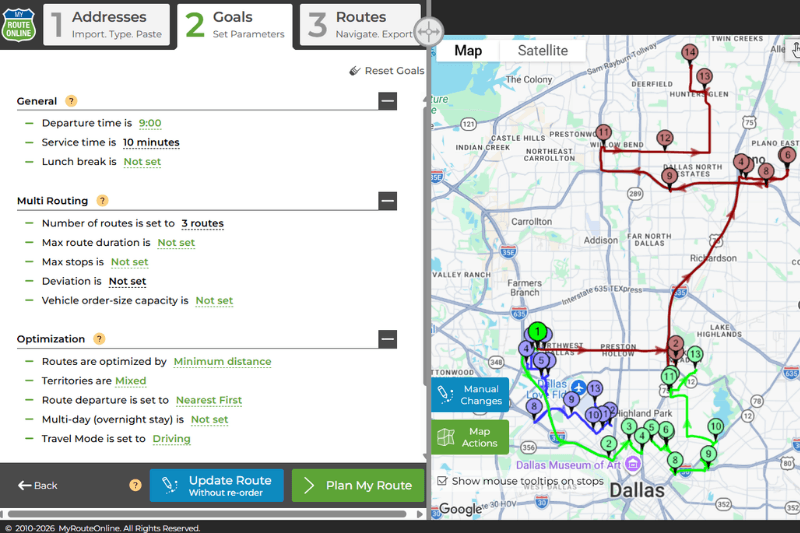
If Streets and Trips was your tool for planning routes with a dozen or more stops, whether for deliveries, service calls, or field visits, MyRouteOnline is built specifically for that workflow. Import a list of addresses from Excel or CSV, get the most efficient stop order calculated automatically, and dispatch routes to multiple drivers from one account.
Drivers can follow their assigned routes on a mobile app with turn-by-turn navigation, while dispatchers track progress in real time from the web planner. For anyone who still wants a paper reference, routes can also be printed as a large map with full turn-by-turn driving directions, so the printable route sheet that Streets and Trips users relied on carries over rather than getting dropped. Plans start at $19 a month with no per-driver fees, and new users can plan routes with up to 20 addresses for free to test the workflow before committing.
For larger trucking-specific fleets with more complex regulatory or ELD requirements, Route4Me is a common alternative worth evaluating alongside MyRouteOnline.
Best for Spreadsheet-Based Route Mapping
One of the most-missed Streets and Trips features was how easily it worked with existing data. MyRouteOnline was built around the same idea: instead of manually re-entering addresses, you import a spreadsheet directly and the software geocodes and sequences the addresses for you. Mapline is another option built around spreadsheet-first mapping, though it leans more toward visualizing data on a map than optimizing multi-stop delivery routes.
Best Free Option
Google Maps remains the best free choice for everyday navigation and live traffic, though it caps you at ten stops and does not truly optimize complex multi-stop order. MapQuest offers a more old-school route-planning feel with up to 26 free stops, which is closer in spirit to how Streets and Trips worked, but it lacks dispatch and tracking features for anyone managing more than a single route.
Best for Long Road Trips
Streets and Trips was popular with RV travelers and road trippers for its overnight stop planning, fuel stop timing, and scenic routing. Roadtrippers and Furkot are the most common modern replacements for that specific use case, both built around leisure travel rather than delivery or business routing.
Best for Sales Territories and CRM Routing
If Streets and Trips was your tool for planning customer visits or managing a sales territory, Badger Maps is the closest modern equivalent, with CRM integration, lead mapping, and route optimization built around field sales rather than delivery. Maptitude also supports custom territory work for teams that want a desktop-based tool.
Best Desktop-Style Replacement
For anyone who specifically wants the old desktop workflow of custom routes, pushpins, and printable maps, Maptitude is generally considered the closest modern equivalent. It runs on Windows and supports offline use, multi-stop routing, and drive-time analysis, though it does not include the multi-driver dispatch or mobile tracking that cloud-based platforms like MyRouteOnline offer.
Why Most Businesses End Up on a Cloud-Based Platform instead of a Desktop Replacement
Streets and Trips was built for a single person planning a single route on a single desktop computer. Most businesses that used it for delivery or field service work have since moved to cloud-based platforms for a simple reason: routes now need to be planned, optimized, and dispatched to multiple drivers at once, tracked from a phone, and still printed on paper when a driver wants that as backup. That shift is what tools like MyRouteOnline were built around from the start, rather than being added on top of a legacy desktop product.
FAQ about MST Alternatives
What happened to Microsoft Streets and Trips?
Microsoft discontinued Streets and Trips, and it is no longer sold or supported. Users who relied on it for route planning, pushpin mapping, or printable directions have had to move to newer web and mobile-based alternatives.
What is the best replacement for Streets and Trips for delivery routes?
For multi-stop delivery and business routing, MyRouteOnline is built specifically for that use case, with Excel and CSV import, automatic route optimization, and multi-driver dispatch. Route4Me is another option, particularly for larger trucking-focused fleets.
Can I still import Excel spreadsheets into a modern route planner the way I could with Streets and Trips?
Yes. MyRouteOnline lets you import addresses directly from an Excel or CSV file rather than entering them manually, and automatically optimizes the stop order once imported.
Is there a free alternative to Streets and Trips?
Google Maps and MapQuest are both free options for basic route planning, though neither offers true multi-stop optimization or dispatch tools. MyRouteOnline offers a free trial with up to 20 addresses and no credit card required for anyone who wants to test full route optimization before paying.