MapQuest vs. MyRouteOnline: Why Stop Count isn't the Real Limit
August 18, 2026
Most comparisons of MapQuest against dedicated routing software focus on one number: how many stops you can plan. MapQuest allows 26 on its free tier, more than Google Maps or Apple Maps, and that comparison usually ends there. But stop count isn’t actually where MapQuest stops being useful for a real delivery or field service business. The real limit shows up the moment a second driver enters the picture, because MapQuest has no concept of a team at all. It plans one route, for one driver, every time.
The Real Gap: One Route for One Driver
MapQuest’s route planner does have a real optimization option, a checkbox that reorders stops for a shorter total route. It’s not just a marketing claim either, independent testing found it genuinely effective: one real-world test across 20 stops in Vancouver cut total driving time from over 4 hours to 1 hour 48 minutes just by enabling it. But it’s opt-in, not automatic, skip the checkbox and MapQuest defaults to the order addresses were entered in. It also doesn’t persist through the day: once a route changes in the field, a stop gets added or skipped, MapQuest doesn’t re-optimize automatically, that has to be triggered by hand again. And even when it runs, it doesn’t account for constraints like vehicle capacity, delivery time windows, or driver shifts the way dedicated fleet routing software does.
None of that is the biggest limitation, though. What actually matters more is what happens once a second vehicle joins the operation: MapQuest has no concept of a team at all. Whatever it plans, optimized or not, it plans one route, for one driver, every time.
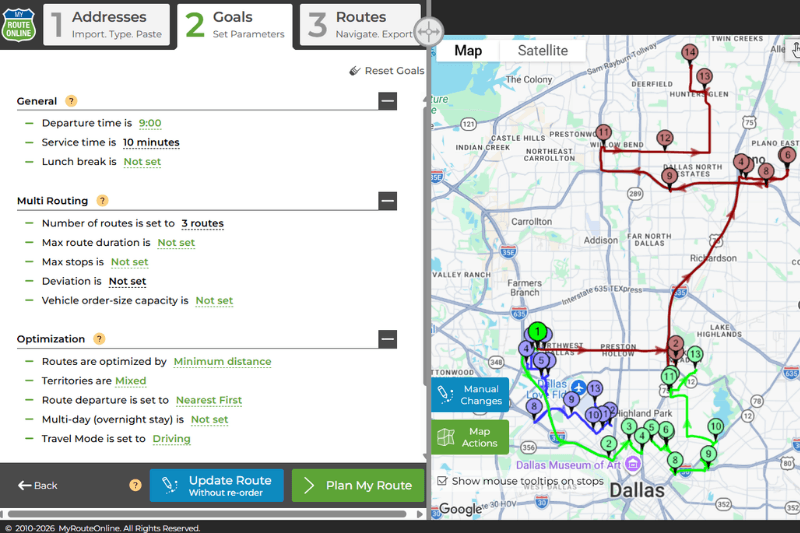
MyRouteOnline’s Territories and Multi-Routing tool solves exactly this. One address list can be split into an unlimited number of separate routes automatically, by setting a maximum stop count or maximum route duration per driver, or by assigning fixed territories so the same driver consistently covers the same area. Upload once, get a full day’s routes back, one per driver, already balanced.
What This Actually Looks Like for a Multi-Driver Business
On MapQuest, planning for multiple drivers means manually deciding which addresses go to which driver before you even open the tool, then running separate planning sessions for each one, copy-pasting or re-entering the relevant subset of addresses each time. The routing itself might be reasonable within each session, but the hard part, deciding who goes where in the first place, is left entirely to the person planning, done by hand, every single day.
Side-by-Side Comparison
| MapQuest | MyRouteOnline | |
| Multi-driver planning | Not supported, one route per session | One upload, automatically split across an unlimited number of drivers |
| Territory assignment | Not available | Assign fixed territories so drivers consistently cover the same area |
| Stops per route | Up to 26 stops | Up to 1,000 stops |
| Address entry | Line by line, copy-paste, or file import (CSV, XLS, XLSX) | File import (Excel, CSV), Google Drive, Dropbox, or plain-text commands in ChatGPT |
| Driver mobile app | Not a dedicated fleet driver app | MyRoute app (iOS and Android) with turn-by-turn navigation per driver |
| Pricing | Free or Monthly plans from $99 to $899 | Monthly plans from $19/month to $799, or Pay as you go |
Beyond Manual Entry: Planning with Plain Language
MapQuest offers three ways to get addresses into the planner: type them in one at a time, copy and paste a block of them, or import a spreadsheet. All three still require someone to do the data entry, the tool just accepts it in different formats.
MyRouteOnline’s AI Route Planner takes this a step further, letting someone plan a route by describing it in plain language directly inside ChatGPT, something like “optimize these 20 stops” or “plan my route for today’s deliveries,” with the resulting route editable, renameable, and reusable from the same conversation. It’s a meaningfully different way of getting from a list of addresses to a finished route, not just a fourth import format.
Mileage and Reimbursement
MapQuest includes an automatic IRS mileage reimbursement calculator, applying the current year’s official IRS cents-per-mile rate directly to a planned route to produce a reimbursement value. MyRouteOnline doesn’t apply that rate automatically, but every route includes the total mileage, so the same calculation, mileage multiplied by the current IRS rate, takes one extra step rather than being built in as a dedicated calculator.
Who Actually Runs Into This
Most people looking at MapQuest alternatives are here for one specific reason: they hit the free tier’s 26-stop wall, or they’re the one person still manually deciding which stops go to which driver every morning. If that’s the actual moment, the fix isn’t really “a tool with more stops,” it’s a tool that knows a route can belong to more than one driver in the first place. That’s the distinction worth checking before switching, not just how high the stop limit goes.
FAQ about MapQuest
Does MapQuest optimize the order of stops automatically?
Only if you turn it on. MapQuest has a specific option, a radio button labeled to let it re-order stops, that has to be selected manually. Leave it unchecked, and MapQuest plans the route in the exact order the stops were entered, no optimization at all. Some comparisons claim MapQuest never optimizes, that’s not quite accurate, but it’s easy to miss the setting and end up with an unoptimized route without realizing it.
Can MapQuest plan routes for multiple drivers?
Not directly. MapQuest plans one route per session, with no way to automatically split a list of addresses across multiple drivers. Businesses using MapQuest with more than one vehicle need to manually decide which stops go to which driver, then run a separate planning session for each.
How many stops can MyRouteOnline plan compared to MapQuest?
MapQuest allows up to 26 stops on its free tier. MyRouteOnline supports up to 1,000 addresses in a single run, and can split that list automatically across multiple drivers rather than planning it as one long route for one vehicle.
Does MyRouteOnline calculate mileage reimbursement like MapQuest?
Not automatically the way MapQuest’s built-in IRS calculator does. MyRouteOnline shows the total mileage for every planned route, so reimbursement can still be calculated by applying the current IRS rate to that number, it just isn’t done for you inside the tool itself.