How to Plan Delivery Routes Just by Chatting with an AI Travel Planner
December 17, 2025
If you manage deliveries, service calls, or sales visits, you already know how much time route planning can steal from your day.
Copying addresses from spreadsheets, tweaking orders, checking time windows, exporting to navigation apps… it adds up.
Now imagine doing all of that just by chatting.
That’s the idea behind an AI Travel Planner: instead of clicking through menus and buttons, you simply tell the system what you want to do in plain language, and it builds and optimizes your routes for you.
Read more to learn how that looks like in practice, and how the MyRouteOnline AI Route Planner changes the way you plan routes.
From Manual Planning to Conversational Planning
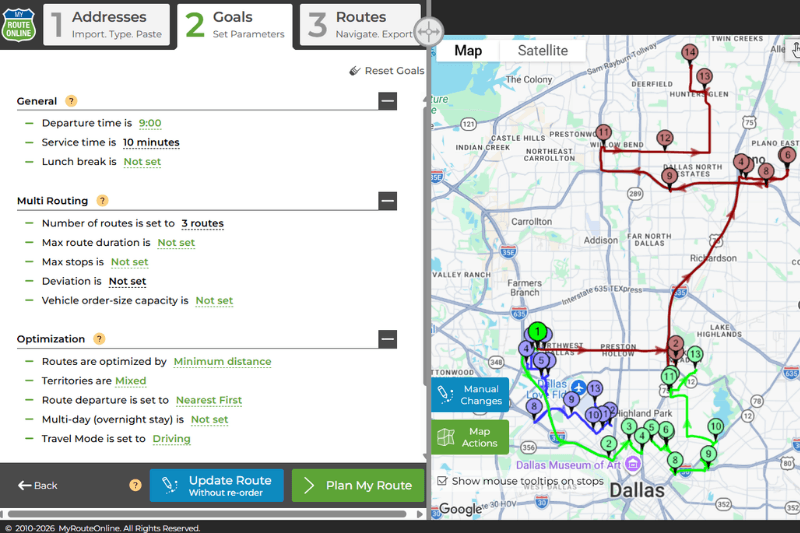
Traditional route planning looks something like this:
- Import or paste addresses
- Choose optimization settings
- Decide how many routes / drivers
- Click “Plan route”
- Review and adjust stops manually
- Export to navigation or print
It works but it’s not exactly intuitive for new users, and it takes focus and time.
With an AI route planner, the process becomes a conversation, and you don’t need to be a computer savvy. Instead of hunting for settings, you just say what you want:
“Plan today’s deliveries, starting at 9am from our warehouse at 123 Main St.”
The AI understands that you want:
- Routes optimized for time and distance
- Departure time is 9am
- Start address is 123 Main St
You type the addresses, speak them, or load them from pdf, csv, xls file, and then it builds the route for you.
How the MyRouteOnline AI Route Planner Works
MyRouteOnline’s AI route planner sits on top of the same proven optimization engine that powers “classic” route planner only now, you don’t have to think about where every button is.
You can simply:
- Paste a list of addresses or upload a file
- Chat with the AI about your constraints
- Let it translate your instructions into route settings
- Get back fully optimized routes you can send to drivers
Some examples of things you can say:
- “These are today’s locations. Plan them and make sure you finish at 5pm.”
- “Please keep these 5 VIP customers at the beginning of the route.”
- “Start from this address and leave a 30 min. Service time for each stop.”
- “Add a 30-minute lunch break around 1 PM.”
Instead of clicking multiple options, the AI does the configuration for you.
Planning Routes by Chatting Step by Step
Here’s how a typical session with the MyRouteOnline AI route planner might look:
- Share Your Stops
You start by giving the AI your addresses in one of these ways:- Dictate them
- Paste them
- Type them in
- Upload a file
“Here is my list of 45 stops for today’s deliveries.”
The AI will confirm it has the addresses and ask you to review them to make sure it got them alright. Then it may ask follow-up questions if needed (for example, start location or constraints). - Tell the AI What You Want
Next, instead of manually choosing settings, you just explain your scenario:
“Plan a route that starts at 9am from 50 Warehouse Rd.”
The AI will make sure you have an account with MyRouteOnline and will communicate with the Route Planner to complete your request. - Let the AI Route Planner Optimize
Behind the scenes, MyRouteOnline runs its optimization algorithm:- Groups stops intelligently between drivers
- Minimizes total driving distance and time
- Respects your constraints (time windows, maximum duration, etc.)
You get the shortest route, connecting your addresses.
- Adjust by Talking to the AI
If something’s not quite right, you don’t have to start over or hunt for a setting. You just say:- “Move this stop to the end.”
- “Make sure this customer is visited first.”
- “Create a separate route just for these 8 locations.”
The AI adjusts the plan and re-optimizes when necessary.
- Send Routes to Your Drivers
Once you’re happy with the plan, you can:- Send routes to the MyRoute app to navigate with Google Maps, Waze, etc.
- Download the routes to your local computer.
- Print a map or directions.
You did the whole thing by having a conversation instead of clicking through a complex interface.
Why an AI Route Planner Is Perfect for Delivery Teams
For many businesses, an AI travel agent style experience is more natural than a classic dashboard. Your team doesn’t need to learn every feature, they just need to know how to describe what they want.
Key benefits for delivery and service businesses:
- Less training time for new users
- Fewer mistakes from forgetting settings or steps
- Faster planning, especially under time pressure
- More flexible “what-if” scenarios:
- “What if we add another driver?”
- “What if we limit routes to 3 hours?”
- “What if we only visit these customers today?”
The AI Travel planner becomes your routing assistant, one that remembers the rules and does the busywork.
Perfect Timing: AI Route Planning for the Holiday Season
The holiday period is exactly when route planning gets messy:
- Extra orders and last-minute deliveries
- Temporary drivers
- New areas you don’t usually serve
- Tighter customer expectations and time windows
During peak season, the difference between “we’re coping” and “we’re drowning” often comes down to how efficiently you can plan routes.
Using an AI route planner means:
- You can react quickly when new addresses come in:
“We just got 10 more stops, fit them into today’s routes with minimal delay.” - You can easily split routes between more drivers:
“Now we have 4 drivers instead of 2; rebalance today’s stops.” - You can keep planning flexible and fast, even when everyone is tired and the schedule keeps changing.
Instead of one person being “the routing expert,” anyone on the team who can chat can help plan routes.
When Should You Try an AI Route Planner?
If any of these sound familiar, it might be time:
- You spend too much time planning daily routes
- You rely on one person who “knows the software”
- Your routes change frequently (daily/weekly)
- You’re heading into a busy season and need to scale
You don’t have to give up your current process, either. With MyRouteOnline, you can:
- Use the AI chat when you want speed and flexibility
- Switch to the classic interface when you want fine-grained control
- Combine both in your workflow
The result: less time planning, more time delivering, and a much smoother busy season.