Can AI Plan my Delivery Route? We Tested Claude and Gemini
October 09, 2026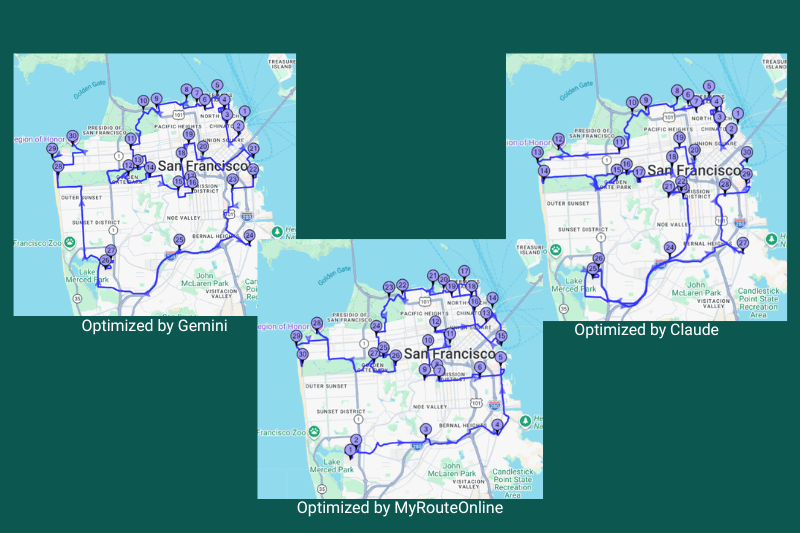
People are starting to ask AI chatbots to plan their routes. Paste in a list of addresses, ask for the best order, and a tidy numbered list comes back in seconds. For a few stops, that can work fine. But the answer usually comes with something else: a confident total for the distance and the drive time.
Those totals are what a dispatcher plans a day around. So it’s worth asking where they come from, and whether they can be trusted.
What AI Tools Tell You About Distance and Time
Ask an AI assistant for the best route through a list of stops and you will typically get three things: an order, a total distance and a total driving time. We asked two assistants to plan the same 30 San Francisco stops, starting at the Ferry Building. This is what they reported.
Gemini returned a route with a total driving distance of about 37.0 miles and a net driving time of about 3 hours 38 minutes.
Claude returned a route with a total driving distance of 36.9 miles and 2 hours 38 minutes of driving.
Every Total is an Estimate. What Matters is what it’s Based On.
No route total is a measurement of a real drive. Traffic, weather and the driver all change the result. That is true for AI answers and for route planning software, including ours. The useful question is what the estimate is built on.
- Claude, in this run: straight-line distance plus a flat 35%, divided by an assumed 14 mph.
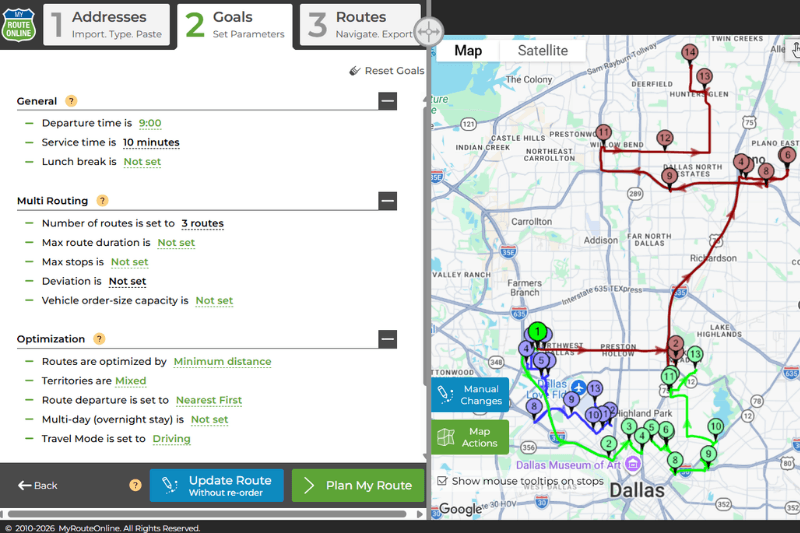
- MyRouteOnline: real-world road distances and travel times, powered by Google Maps data, calculated between the stops. According to our blog, the calculation takes traffic patterns, turn restrictions and one-way streets into account.
One approach starts from a map. The other starts from the roads.
Why AI Totals Need Checking
1. Without a routing service, an AI works from a map, not from roads. Some AI products can be connected to a maps or routing service and look up real road distances. Without one, a chatbot has two options: calculate straight-line distance from coordinates, or estimate from what it learned in training. Either can come out sounding precise and still be wrong. If you use an AI for routes, ask which kind of distance it gave you.
2. A flat percentage can’t stand in for the road network. Adding 35% to straight-line distance is a reasonable rule of thumb, and Claude was upfront about using it. But the real gap varies a lot from one leg to the next. In a separate Bay Area test, Tiburon to Berkeley was about 10.3 miles in a straight line and about 24.3 miles by road, which is more than double. Sausalito to Oakland City Hall was 12.9 miles in a straight line and 26.0 miles by road. Bays, hills, rivers, rail lines, highways and one-way streets all change what “close” means.
3. Drive time is a separate guess. Time between stops depends on road type, speed limits, lights, turns and ramps. A routing engine adds these up along each road segment. Without one, an AI divides a distance by an assumed average speed, like the 14 mph Claude used. If the distance was already off, the time will be too. A shorter route also isn’t always a faster one.
4. The number of possible orders is enormous. With a fixed start and 29 stops left to order, there are about 8.8 million trillion trillion possible sequences. No one checks them all. Optimizers use proven search methods. A chatbot is not designed to run that search, so the order it gives is a plausible guess.
5. Real routes have rules. Delivery days involve time windows, vehicle capacity, driver shifts, service times at each stop and often several vehicles. A quick chatbot answer rarely accounts for all of these, and it can drift when you add one more constraint.
6. Plans change during the day. A cancelled stop, a new pickup or a late customer means re-planning. With a chatbot, that means starting a new conversation, and the new order may not resemble the old one. With an optimizer, you re-run the route in seconds and compare.
The Test: 30 Real Stops in San Francisco
To see how this plays out, we built a list of 30 real San Francisco stops, from the Ferry Building and Coit Tower to Oracle Park, Beach Chalet and the Legion of Honor. The Ferry Building was the fixed starting point, and the end point was left open.
We gave the list to two AI assistants, Claude and Gemini, and asked each for the most efficient order. We then ran the same 30 stops through MyRouteOnline with the same start. To measure all three on equal terms, we loaded each AI order into MyRouteOnline and read off the total distance and drive time.
The Results
| Route | Ends at | Total miles | Total drive time |
| MyRouteOnline | Oracle Park | 44.33 | 3:52 |
| Claude | Oracle Park | 49.99 | 3:52 |
| Gemini | Legion of Honor | 48.91 | 4:01 |
- Claude’s route was 5.66 miles longer, about 11% more distance than MyRouteOnline’s, with the same total drive time.
- Gemini’s route was 4.58 miles longer, about 9%, and took 9 minutes more.
Neither AI route was a disaster. Both were usable as an order of stops. But on a route that repeats every day, a gap of 5 miles adds up across days, drivers and vehicles. And the totals the AI tools reported did not match the road-based figures, as the next section shows.
What the AI Said vs. what we Measured
| Reported by the AI | MyRouteOnline road-based figure | |
| Gemini’s route | About 37.0 miles, about 3:38 | 48.91 miles, 4:01 (same order) |
| Claude’s new run | About 36.9 miles, about 2:38 | 44.33 miles, 3:52 (MyRouteOnline’s optimized route for the same stops) |
For Gemini, the road-based distance is 11.9 miles (about 32%) higher than reported, and the time is 23 minutes longer.
For Claude’s new run, the table compares the AI’s totals with the optimized route MyRouteOnline found for the same stops, because we did not measure that exact order. Claude’s reported distance is 7.4 miles (about 17%) lower, and its reported time is 1 hour 14 minutes shorter. It’s notable that two different assistants, with different orders, reported almost the same distance.
We also checked Claude’s method. For the earlier Claude order we measured above, the straight-line distance between consecutive stops adds up to about 31.6 miles. Adding 35% gives about 42.6 miles. MyRouteOnline’s road-based figure was 49.99 miles, about 58% above straight-line. And the 14 mph Claude assumed is faster than the average implied by MyRouteOnline’s times for these routes, which work out to about 11.5 to 13 mph.
What This Test Does and Doesn’t Show
This was one test with one set of stops, so we are not claiming AI is always about 10% worse. A different city or a different 30 stops could give a different gap. All three measured distances and times were calculated by MyRouteOnline, including those for the AI routes. They are estimates from road data, with no time spent at stops included. Gemini’s route also ended at a different stop, and the Claude totals above came from a separate run, so that order differs from the one we measured at 49.99 miles.
A Second Example: When “51 Miles” Turned Out to Be 86
We then asked Claude to optimize a list of 55 delivery addresses around Princeton and West Windsor, New Jersey, starting from a fixed depot. Claude had no road data in that session, so it used the straight-line distance between each pair of coordinates and reported a total of 51.47 miles, noting that it was a straight-line figure.
Measured on the road, the same route came to 86 miles, about 67% more. The order was good for the measure Claude used. That measure just wasn’t driving. The label was there, but a number like 51.47 is easy to quote as “the route length,” which is why the label matters.
Check Any AI Route With MyRouteOnline
You don’t have to take our numbers, or an AI’s, on trust. You can test any route in a few minutes with MyRouteOnline, using your own stops.
- Get the AI’s order. Ask your AI assistant for the best order for your stops, and keep the starting point fixed. Note any distance and time it reports.
- Enter the list in that order. Paste or upload the addresses into MyRouteOnline in exactly the order the AI gave you.
- Run it with “keep order as is.” MyRouteOnline will not re-sort anything. It calculates the total distance and drive time for the AI’s sequence over real roads.
- Run the same list again as optimized. Use the same stops and the same starting point, and let MyRouteOnline find the order.
- Compare the totals. Look at total miles and total drive time side by side, and against any totals the AI gave you.
For a fair comparison, use the same starting point and the same end point (or an open end) in both runs, and try more than one set of stops.
If the AI’s order is already close to the optimized one, you’ve confirmed that it works for that list. If the optimized route is noticeably shorter, you’ll see how many miles and minutes the AI’s order would have added, before a driver leaves the depot.
Or Let the AI Use a Real Route Planner
There is another option: don’t make the AI do the routing at all. MyRouteOnline connects to Claude and ChatGPT through the Model Context Protocol (MCP), an open standard for linking AI assistants to outside tools. You connect the assistant once, sign in with your MyRouteOnline account, and then describe your stops in the conversation. The assistant sends them to MyRouteOnline’s route planner, which does the optimizing with road data, and returns the optimized order with navigation links. You can also have the results emailed to you or your team.
That way, the AI handles the conversation, such as reading your list and answering questions, and the route planner handles the distances and times, so the assistant isn’t working from its own calculations. See the guides for Claude and ChatGPT.
When a Chatbot Alone Is Still Useful
AI is good at things around the route: drafting customer messages, cleaning up an address list or explaining a route to a driver. For a handful of stops, it may be all you need. Once you have a long list, repeating routes, or constraints that matter, road-based distances and an optimizer are the safer choice, whether you use the planner directly or through your AI assistant.
FAQ about AI Tools Planning Routes
Can ChatGPT, Claude or Gemini optimize a delivery route?
They can suggest an order, and for a few stops it is often reasonable. On longer lists the order can be noticeably longer than an optimized one. In our 30-stop test, both AI routes were 9% to 11% longer than MyRouteOnline’s.
Are the distances and times an AI reports accurate?
Every route total is an estimate, but they are built differently. In our test, Gemini reported about 37.0 miles and 3 hours 38 minutes for a route that MyRouteOnline’s road-based calculation put at 48.91 miles and 4:01. Claude reported about 36.9 miles and 2 hours 38 minutes, and said itself that these were estimates from straight-line distances. Unless the AI is connected to a routing service, verify its totals.
Do AI chatbots use real road distances?
It depends on the tool. If the AI is connected to a maps or routing service, it can look up road distances. Without one, it estimates, or it uses straight-line distance from coordinates, sometimes with a percentage added for roads. Ask the AI which it used.
Can Claude or ChatGPT use MyRouteOnline to plan a route?
Yes. MyRouteOnline connects to both through MCP. After a one-time setup, you describe your stops to the assistant and it uses MyRouteOnline’s route planner for the optimization, instead of its own calculations. ChatGPT needs MCP support to connect.
How does MyRouteOnline calculate distance and time?
It uses real-world road distances and travel times, powered by Google Maps data, and takes traffic patterns, turn restrictions and one-way streets into account. The results are estimates of drive time and distance.
Why is straight-line distance a problem for route planning?
Roads are not straight. Water, hills, one-way streets and highway access can make two nearby points far apart by road. In one Bay Area example, two points about 10 miles apart in a straight line were about 24 miles apart by road.
Can an AI tell me how long a route will take?
Only reliably if it is connected to a routing service. Otherwise it estimates time from a distance and an assumed average speed, such as 14 mph. Routing engines add up road segments, speeds and turns, and some also use traffic data.
How much distance can route optimization save?
It depends on your stops. In this test, MyRouteOnline’s route was 5.66 miles (about 11%) shorter than Claude’s and 4.58 miles (about 9%) shorter than Gemini’s. Your results will vary with the number of stops, their spread and your constraints.
Does a shorter route always mean a faster route?
Not always. Against Claude’s route, MyRouteOnline’s route saved miles but had the same 3:52 drive time. Against Gemini’s, it saved 9 minutes. Road speeds, turns and traffic all affect time.
How can I check if an AI-planned route is efficient?
Enter the AI’s order in MyRouteOnline with “keep order as is,” then run the same stops optimized and compare total miles and drive time.
When should I use a route optimizer instead of a chatbot?
When you run many stops, repeat routes daily, or have time windows, capacity limits or several vehicles. A route optimizer works from road data and handles those rules, and you can use it directly or through Claude or ChatGPT.