Can Ask Maps, Google's New AI Feature, Plan Your Business Routes?
April 10, 2026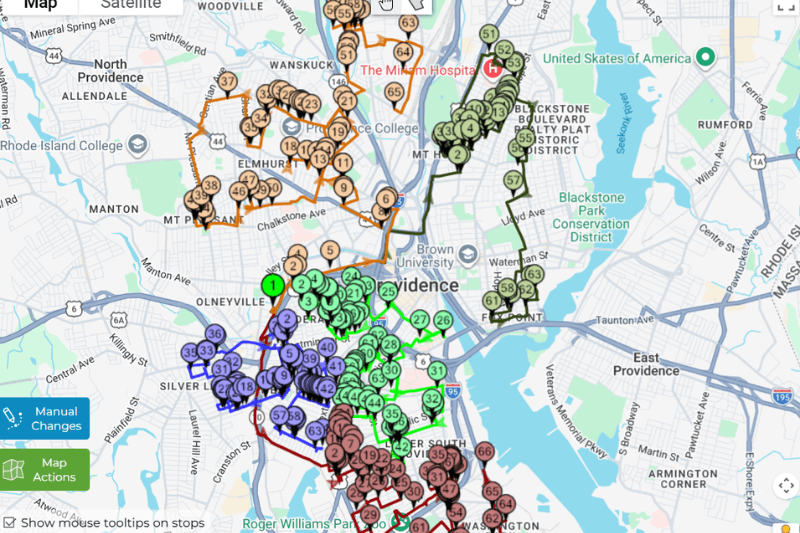
Google Maps just received what the company calls its biggest update in over a decade. On March 12, 2026, Google launched Ask Maps, a Gemini-powered AI feature that lets users ask complex, conversational questions and get personalized recommendations from over 300 million places and 500 million community contributors.
It looked genuinely impressive. You can ask things like “I’m headed to the Grand Canyon, Horseshoe Bend, and Coral Dunes, any recommended stops along the way?” and get back directions, ETAs, and insider tips from real people. You can ask for a restaurant with outdoor seating available at 7pm, a public tennis court with lights on tonight, or somewhere to charge your phone without waiting in a queue. Ask Maps understands the question, personalizes the answer based on your history, and lets you act on it, booking, saving, sharing, navigating, without leaving the app.
For consumers planning a night out or a road trip, Ask Maps is a genuine leap forward. But for a small business owner trying to plan 40 delivery stops across a city before 8am, it changes almost nothing.
What Ask Maps Actually Does
Ask Maps is a discovery and planning tool. It uses Google’s Gemini AI model to answer natural-language questions about places. It excels at helping you find a location that fits a very specific set of criteria.
Ask Maps is personalized to you, letting you easily turn plans into action. Once you have a place in mind, you can book restaurant reservations, save places to a list or share them with friends, and get directions and navigate to your destination with just a few taps.
Traditional Google Maps search required keyword inputs and returned a list of matching businesses. Ask Maps accepts full conversational questions with multiple conditions and context including time-of-day, atmosphere preferences, and multi-step trip planning. Then it returns curated, AI-generated recommendations with narrative summaries and personalized results based on your Maps history.
This is very useful. If you’re a real estate agent scouting neighborhoods, a salesperson trying to find coffee between client visits, or a tradesperson who wants to know what’s near your next job, Ask Maps is a better experience than anything Google Maps offered before.
But Ask Maps is built for discovery. It is not built for dispatch.
The Hard Limits Google Maps Has Always Had and Still Has
Before Ask Maps launched, Google Maps had a well-known set of limitations that made it unsuitable as a primary planning tool for businesses with multi-stop daily operations. Google Maps has a hard limit of 10 stops. It hits this limit fast whenever you run deliveries or service calls all day. It then forces you to split one day into two or three separate routes. This adds extra planning time and creates a risk of missing a stop.
Ask Maps does not change this. The 10-stop ceiling on Google Maps routing remains in place. Google Maps isn’t made to do the computational heavy lifting required for route optimization. Google Maps can help you see where you are going, but it can’t help you reduce the costs of getting there.
There are also deeper structural limitations that Ask Maps does not touch. Google Maps does not automatically optimize the sequence of your stops. It routes them in the order you enter them, or it tells you to reorder them yourself. The algorithm doesn’t automatically select the best order of stops for your entire route. Instead, it computes the best path to get from one point on your route to the next. It doesn’t solve the Travelling Salesman Problem.
For a business making 8 deliveries, this is manageable. For a business making 35 deliveries across multiple drivers, it is the difference between a profitable day and a chaotic one.
What Small Business Owners Actually Need
Here are the things a real delivery business, field service company, or sales team deals with every single working day, and how Ask Maps and Google Maps handle each one.
- Importing an address list from Excel or a CRM export
- Optimizing the sequence of all stops
- Planning routes for multiple drivers simultaneously
- Dispatching routes directly to driver phones
- Tracking deliveries in real time
- Handling more than 10 stops per route
A delivery manager with 60 stops to plan doesn’t type addresses one by one. They export a spreadsheet from their order system and need to upload it. Google Maps and Ask Maps offer no import functionality. Every address has to be entered manually.
The difference between a well-sequenced 40-stop route and a poorly sequenced one can easily be 60–80 extra kilometres of driving. That’s an hour of driver time and significant fuel cost, every single day. Google Maps does not solve this. You arrange the stops yourself or guess.
A dispatcher managing five delivery drivers needs five optimized routes, ideally generated from a single address list, split fairly across the team, and sent to each driver’s phone before 8am. Google Maps has no concept of multi-driver planning. Ask Maps does not add it.
Once a route is planned, it needs to get to the driver. In Google Maps, you share a link and the driver follows it in the app. There’s no structured dispatch, no confirmation, no way to track progress across your team.
Knowing which stops each driver has completed, whether they’re running late, and what the updated ETA is for the remaining stops, this is standard operational need for any delivery business. Google Maps and Ask Maps provide none of it.
This remains the most immediate practical limit. A courier doing 30 drops, a pharmaceutical rep visiting 25 clinics, a field service team with 18 booked appointments, none of them can use Google Maps for a single continuous route.
Ask Maps, for all its genuine innovation in conversational discovery, does not address any of these requirements. It was designed for a different user with a different problem.
What MyRouteOnline Does Instead
MyRouteOnline was built specifically for the operational reality of small and medium businesses that visit multiple locations every day.
- The difference starts at the very first step. Instead of typing addresses one by one, you upload your address list directly from Excel, CSV, Google Drive, or Dropbox. An import wizard maps your columns automatically. A 40-stop delivery manifest that would take 20 minutes to enter Google Maps takes about 45 seconds to import into MyRouteOnline.
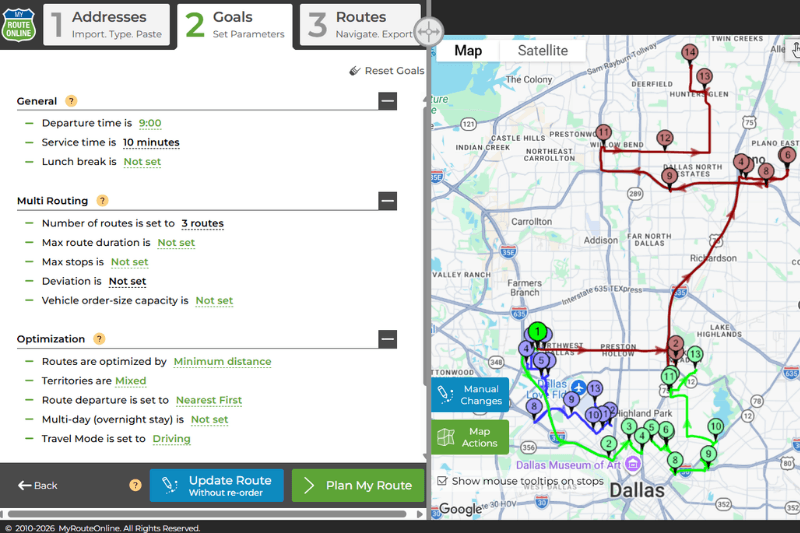
- Then the optimizer runs. Using a patented algorithm (US Patent #9631938), MyRouteOnline solves the sequence problem, finding the most efficient order to visit all your stops, factoring in real road network distances and travel times rather than straight-line estimates. You choose your optimization goal: minimize drive time, minimize total distance, or a balanced approach that considers both. The result is a route that a human planner working by eye could not produce, regardless of how long they spent on it.
- For businesses with multiple drivers, the entire fleet is planned in one session. Upload one address list, specify how many drivers you have, and MyRouteOnline generates optimized, balanced routes for each one simultaneously, respecting territory boundaries and workload limits. Every driver receives their route on the free MyRoute app on their smartphone, with turn-by-turn navigation, stop-by-stop directions, and the ability to mark each delivery complete. From the web interface, you can watch the whole operation in real time.
- The stop limit depends on your plan. Up to 350 stops per session on Classic and Premium plans, 500 on Professional, and 1,000 on Business. Routes can be exported to Google Maps, TomTom, or Garmin GPS devices. They can be emailed to drivers, shared via a direct link, or sent as a QR code for drivers to scan. Paper printouts with full turn-by-turn directions are available for drivers who prefer them.
The Numbers That Make the Case
Route optimization is not a small operational advantage. The efficiency difference between an optimized route and a manually planned one is consistently measured at 15–30% fewer kilometres driven per day.
For a delivery business running three vehicles five days a week, 15–30% fewer miles translates directly into fuel savings, reduced vehicle wear, and either lower labour costs or more deliveries completed in the same working hours. Many MyRouteOnline customers report recovering the cost of their subscription within the first week of use, simply from the fuel savings alone.
The planning time saving is equally significant. A dispatcher spending 45 minutes every morning manually building routes in Google Maps, splitting a 40-stop list into groups of 10, figuring out a sensible sequence for each group, then distributing them to drivers, replaces that process with a 5-minute import and optimization. That’s 40 minutes per day, more than three hours per week, returned to the business.
Where Ask Maps and MyRouteOnline Complement Each Other
It would be wrong to frame this as a competition. Ask Maps and MyRouteOnline solve different problems, and there are useful ways to use both.
A field sales representative could use Ask Maps to discover a new prospect location in an unfamiliar neighbourhood by asking “what businesses near Oak Street might need office supply deliveries?” That address can then be added to their weekly client list in MyRouteOnline for route optimization. A delivery manager could use Ask Maps to find the nearest depot open on a bank holiday, then plan the adjusted day’s routes in MyRouteOnline.
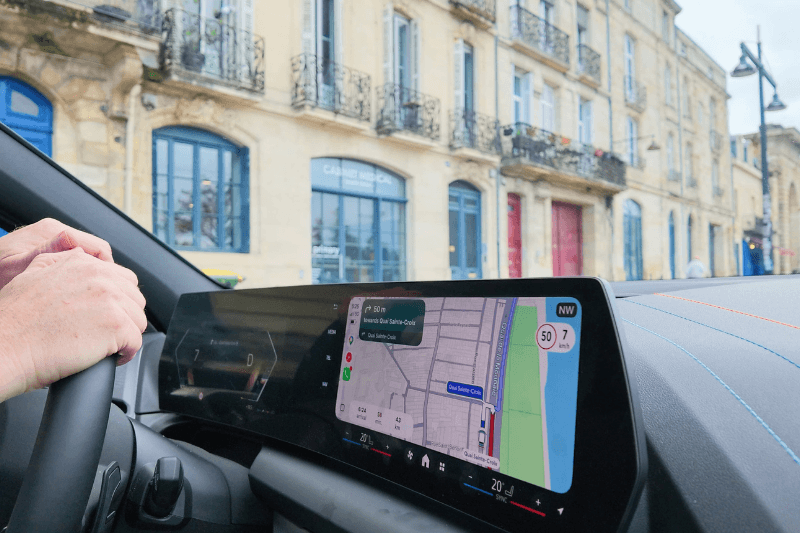
Google Maps is also one of the navigation platforms that MyRouteOnline uses with the MyRoute app. Once your routes are optimized, drivers can navigate each one using Google Maps on their phone, giving them the turn-by-turn experience they’re already familiar with. Ask Maps’ improvements to the navigation experience (the 3D Immersive Navigation, the natural voice guidance, the alternate route trade-off explanations), benefit MyRouteOnline users directly, because they navigate in the same app.
The planning happens in MyRouteOnline. The driving experience happens in Google Maps. These are not competing tools, they’re consecutive steps in the same workflow.
Who Should Be Using MyRouteOnline Right Now
If your business involves any of the following, MyRouteOnline will save you measurable money and time starting from day one:
- You run a delivery operation, parcels, food, flowers, medical supplies, retail replenishment, and your drivers make more than 10 stops per day.
- You manage a field service team, HVAC, plumbing, cleaning, electrical, pest control, and you dispatch technicians to multiple appointments each morning.
- You lead a sales team with territory accounts that need regular visits, and your reps are currently planning their own routes by eye or gut instinct.
- You operate a fleet of two or more vehicles and you’re currently splitting routes manually across spreadsheets or Google Maps.
- You run a nonprofit, charity, or volunteer organization with seasonal distribution campaigns, holiday gift drives, food bank deliveries, fundraiser pickups that currently consume hours of manual planning.
MyRouteOnline offers a free trial with no credit card required. Plans start at $19 per month, with a Pay As You Go option from $24 for organizations that only need routing occasionally.
The Bottom Line
Google’s Gemini-powered conversational interface, drawing on 300 million places and 500 million contributors, is more useful for discovery and personal trip planning than anything Google Maps has offered before.
But it is a discovery tool. It helps you find places. It does not help you build a 40-stop delivery manifest, optimize the sequence across your fleet, dispatch routes to multiple drivers, or track completions in real time. Those capabilities have never existed in Google Maps and Ask Maps does not add them.
For small business owners whose daily operations involve visiting multiple locations, the right tool is purpose-built route optimization software. MyRouteOnline has been solving that specific problem since 2009.
Ask Maps is a better way to find your next destination. MyRouteOnline is how you run the route after you know where you’re going.
FAQ about Ask Maps
What is Ask Maps and how is it different from regular Google Maps?
Ask Maps is a Gemini AI-powered conversational feature launched in Google Maps on March 12, 2026. Unlike standard Google Maps search, which requires keyword inputs, Ask Maps accepts natural-language questions with multiple conditions and returns personalized, AI-generated recommendations from over 300 million places. It is designed for place discovery and personal trip planning, not for commercial route optimization.
Can Ask Maps plan delivery routes for my business?
Not in any meaningful way for business use. Ask Maps helps you find places, not optimize the sequence of stops across a multi-stop delivery route. Google Maps still has a hard limit of 10 stops per route, does not automatically optimize stop sequencing, has no multi-driver planning capability, and does not support Excel or CSV address imports. Ask Maps does not change any of these limitations.
What is the difference between Google Maps and route optimization software like MyRouteOnline?
Google Maps is a navigation and discovery tool designed primarily for personal use, getting from point A to point B efficiently. Route optimization software like MyRouteOnline is designed for commercial operations with many stops: it imports address lists from Excel, automatically sequences stops to minimize total drive time or distance, plans routes for multiple drivers simultaneously, tracks deliveries in real time, and handles up to 1,000 stops per session. The two serve different purposes and are best used in combination.
How many stops can Google Maps handle compared to MyRouteOnline?
Google Maps supports a maximum of 10 stops per route, which must be reordered manually. MyRouteOnline supports up to 350 stops per session on Classic and Premium plans, 500 on Professional, and 1,000 on Business. All stops are automatically sequenced in the optimal order.
Is MyRouteOnline compatible with Google Maps?
Yes. Routes planned in MyRouteOnline can be exported directly to Google Maps for turn-by-turn navigation. Drivers use Google Maps on their phone in the usual way but they follow a route that has been optimized by MyRouteOnline rather than sequenced manually. Google Maps’ improvements through Ask Maps and Immersive Navigation benefit MyRouteOnline users directly, since they navigate in Google Maps.
Can I import my delivery address list into Google Maps?
No. Google Maps has no import functionality, and every address must be entered manually. MyRouteOnline accepts address list imports from Excel (.xlsx, .xls), CSV, plain text, Google Drive, and Dropbox. An import wizard maps your columns automatically, including additional fields like customer names, notes, or phone numbers, which appear alongside each stop in the planned route.
Which businesses benefit most from MyRouteOnline over Google Maps?
Businesses that visit more than 10 locations per day, manage multiple drivers or technicians, need to import address lists from existing systems, or want to track delivery completion in real time.
How much does MyRouteOnline cost compared to Google Maps?
Google Maps is free for personal use. MyRouteOnline plans start at $19 per month (Basic) with a Pay As You Go option from $24 valid for 12 months. A free trial is available with no credit card required. Given the fuel savings and planning time savings route optimization delivers for most businesses, the subscription typically pays for itself within the first week of use.