5 Essential Delivery KPIs for Small Business Owners
February 16, 2026
Why Delivery KPIs Matter for Small Businesses
For small delivery based businesses, every extra mile, minute, or missed stop hits your profit much harder than it does for a big fleet. Tracking a few clear delivery KPIs gives you a simple dashboard: you can see what’s working, what’s leaking money, and whether changes like using route planning software are actually helping.
You do not need 20 complex metrics to run a tight operation. You just need a handful of delivery KPIs for small businesses that are easy to calculate and directly tied to routing and driver behavior.
KPI 1: Cost per Stop
Cost per stop (or cost per delivery) is how much it costs you, on average, to complete a single delivery. It typically includes fuel, driver wages, and vehicle costs.
Simple way to calculate:
- Add up your delivery related costs for a period (fuel + driver pay + vehicle costs).
- Divide by the number of completed stops.
If this number is rising while your volume is stable or growing, your routes are probably inefficient and your vehicles are driving more miles than necessary.
How route planning software helps:
- Shorter routes and better stop sequencing reduce miles and fuel per stop.
- Less overtime and fewer re deliveries shrink driver cost per stop.
- You can quickly compare cost per stop “before vs. after” using the software to see real savings.
KPI 2: On Time Delivery Rate
On time delivery rate is the percentage of orders that arrive within the promised time window. Customers feel this metric directly and late orders are one of the fastest ways to undermine trust.
Simple way to calculate:
- Count how many stops were delivered on or before the promised time.
- Divide by total stops and convert to a percentage.
Many small businesses never define time windows or track this KPI, so they have no idea how often they’re late until complaints spike.
How route planning software helps:
- Lets you set realistic time windows and service durations per stop, then builds routes that fit them.
- Gives better estimates of route duration so you don’t over promise on how many deliveries fit in a day.
- Makes it easier to update ETAs when you re plan routes mid day if new orders arrive.
KPI 3: First Attempt Delivery Success rate
First attempt success rate measures how many deliveries are completed on the first try, without needing a second trip or reschedule. Each failed first attempt is expensive: you pay for an extra visit but don’t earn extra revenue.
Simple way to calculate:
- Count how many orders were completed on the first attempt.
- Divide by total orders and convert to a percentage.
Low first attempt success often comes from poor timing (arriving when the customer isn’t there), inaccurate addresses, or unrealistic route plans.
How route planning software helps:
- Helps you separate office vs. home deliveries more intelligently.
- Makes it easier to clean and validate addresses before routes are planned.
- Lets you prioritize “sensitive” stops earlier in the day when there’s more room to recover if something goes wrong.
KPI 4: Miles per Stop
Miles per stop shows how many miles you drive, on average, to complete one delivery. It’s a very direct measure of how efficient your routing is.
Simple way to calculate:
- Track total miles driven (from your vehicles or fuel logs) for a period.
- Divide by total stops completed.
If this number is trending upward, your routes are probably zig zagging, overlapping territories, or sending vehicles too far for too few stops.
How route planning software helps:
- Optimizes stop order to minimize backtracking and unnecessary detours.
- Allows you to design territories or zones for different drivers so they aren’t overlapping each other.
- Often reduces total mileage by 15–30% compared to manual planning, which directly improves miles per stop.
KPI 5: Driver Hours vs. Stops Completed
Driver hours vs. stops completed shows how many deliveries your team can complete per hour of driver time. It’s a simple productivity measure: are your drivers spending most of their time driving and delivering, or stuck in traffic and bad routing?
Simple way to calculate:
- Add up all driver hours for a period (including overtime).
- Divide stops completed by total driver hours to get stops per hour.
If stops per hour are flat or declining while demand rises, you’re likely hitting planning limits rather than capacity limits.
How route planning software helps:
- Builds tighter, smarter routes so drivers spend less time wandering between stops.
- Makes it easier to balance routes fairly between drivers (similar hours and stops).
- Reduces manual planning time, freeing the owner or dispatcher to focus on coaching drivers and solving real issues.
How to Get Started with Delivery KPIs in One Week
You don’t need a full BI stack to start using delivery KPIs for small business. Over the next week, you can:
- Record daily: total miles, total stops, total driver hours, and how many orders were late or failed on the first attempt.
- Calculate: cost per stop, on time rate, first attempt success, miles per stop, and stops per driver hour.
Then use your route planner to compare how you plan today vs. how optimized routes would look:
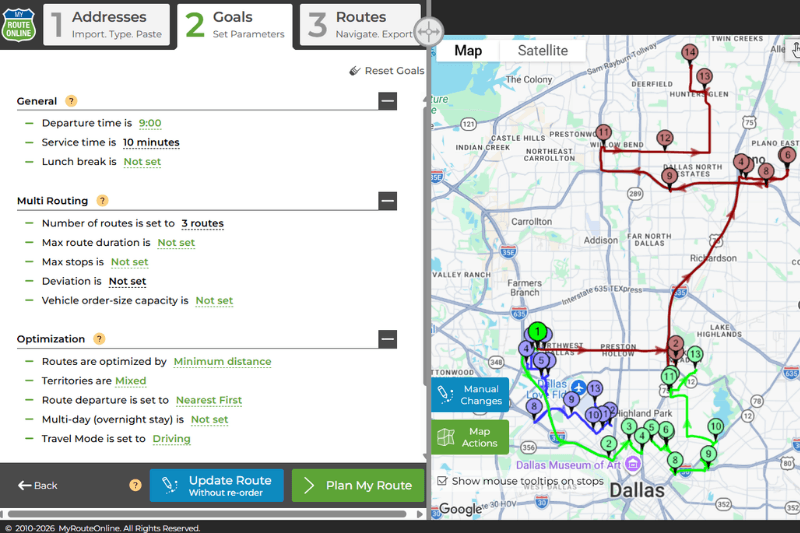
- First, load your current routes and choose “Keep order as is”. This shows you a realistic picture of how your existing routes are actually being run today, with your current stop order.
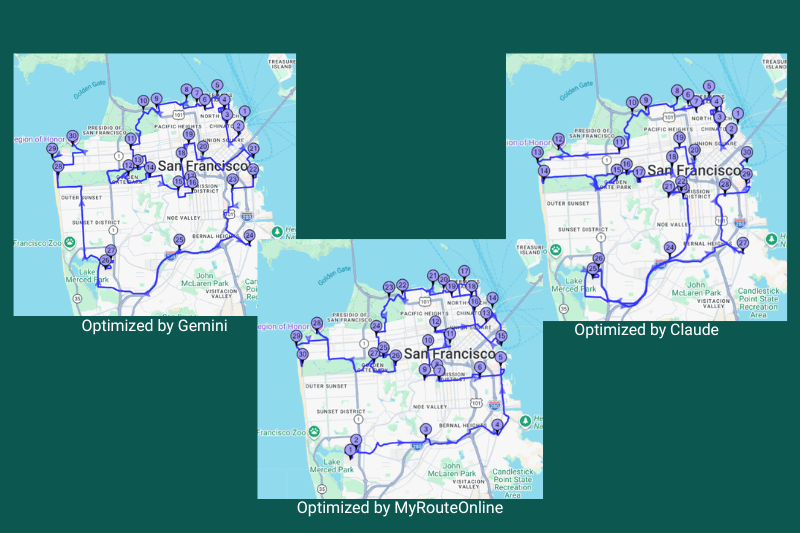
- Next, run the same list of stops with “Minimize distance” selected. This lets the route planner reorder the stops to create the shortest logical route for each driver.
By comparing “keep order as is” vs. “minimize distance”, you can see in seconds how many miles, minutes, and driver hours your current planning is leaving on the table, and what that means for cost per stop and miles per stop.
If your KPIs show lower cost per stop, better on time rate, and fewer miles per stop once you start using a planner, you’ll know you’re not just “feeling” more organized, you’re actually running a more profitable delivery operation.
FAQ – Delivery KPIs for Small Businesses
Which delivery KPIs should a small business track first?
Start with a small set of KPIs that are easy to calculate and directly tied to your daily routes:
cost per stop, on-time delivery rate, first-attempt delivery success, miles per stop, and driver hours versus stops completed. Together, these show you how efficiently you turn fuel, labor, and vehicle time into successful deliveries.
How often should I measure my delivery KPIs?
For most small businesses, tracking delivery KPIs weekly is enough to spot trends without creating extra admin work. You can review high-level numbers each week and then do a deeper monthly check to compare before-and-after changes, such as when you start using route planning software or add new drivers.
Can I track delivery KPIs without special software?
Yes. You can track basic delivery KPIs in a simple spreadsheet using information you already have: fuel receipts, driver timesheets, odometer readings, and the number of daily orders. Route planning software makes it easier to improve those KPIs, but you can start measuring them with tools you already use.
How does a route planner help improve my delivery KPIs?
A route planner helps reduce miles per stop, lower fuel and overtime costs, and improve on-time and first-attempt delivery rates by optimizing stop order and balancing work between drivers. Over time, these improvements are reflected directly in lower cost per stop and higher stops per driver hour, which means a more profitable delivery operation.