How to Export Routes as Excel File
Exporting is different from Saving routes.
If you choose to Export your route, it will be saved on your local computer, while if you choose to Save your route, it will be saved on our servers.
Saving your route online will allow you to reload it and see the result immediately on the map but if you wish to export your route as an Excel file, choose one of these two ways:
- Click “Save and Export” at the top left corner, to export all your route plans and place every route in a separate sheet. This is usually used for printing and for exporting all route plans together.
- Click the three dots next to each route and select “Export Route” to export only the specific route plan that you chose.
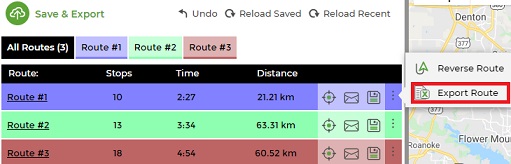
Export Route
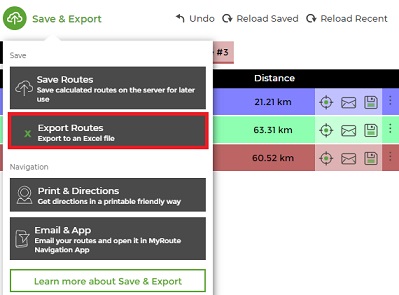
Export Routes
Both options can be used for importing a file back to the planner for future use.
Follow these steps:
- Plan a route.
- Click Export (as mentioned above).
- Save your route plan to your computer.
Your exported file will now include all information you had when you planned your routes, including comments, service time, order size, etc.
FAQ about Exporting Routes from MyRouteOnline
How do I export all my routes to Excel at once?
To export all your route plans together in a single Excel file, click “Save and Export” at the top left corner of the planner. This exports every route plan in your current session, placing each route in a separate sheet within the same Excel workbook. This option is most useful when you have planned multiple driver routes from one address list and want to share, print, or archive all of them together in one file.
How do I export just one specific route rather than all of them?
To export a single route, click the three dots next to the specific route you want to export in the route list and select “Export Route.” This downloads only that individual route as an Excel file, without including any other routes from your current session. This is useful when each driver needs their own separate file, or when you want to export one route for a specific purpose while keeping the others in the planner.
What information is included in the exported Excel file?
The exported Excel file includes all the information that was present when you planned the route. This includes every stop in its optimized sequence, the full address of each stop, estimated arrival time at each stop, distance from the previous stop, total route distance, total route duration, and any additional data you imported alongside your addresses such as customer names, comments, notes, service time, and order size. The exported file is a complete record of the route plan and contains everything your drivers or operations team would need for reference, reporting, or invoicing purposes.
Can I reimport an exported Excel file back into MyRouteOnline?
Yes. An exported Excel file can be reimported into the planner using the Import and Reload feature. This is useful when you want to make manual adjustments to a previously exported route, use an exported file as the starting point for a new planning session, or archive and then restore a route at a later date. Both the “Save and Export” option and the individual “Export Route” option produce files that are compatible with reimporting.
Can I export a route and then edit it manually in Excel before reimporting?
Yes. Once you have exported your route to Excel, you can open the file and make changes directly in the spreadsheet. You might update customer details, adjust notes, change route numbers, or reorganize stop groupings. When you reimport the modified file, use the Import Wizard to map the columns correctly. If you want to preserve the existing stop sequence rather than re-optimizing, set the Optimization Goal to “Keep Order As Is” in the Goals section before clicking Plan My Route. This allows you to use the reimported file as a structured route without the optimizer changing the stop order.
How do I send an exported route to my driver?
The most common way to get a route to a driver is to email it directly from the planner using the Email Route option, which sends the driver a link to view their route and navigate it using the free MyRoute app on their smartphone. If you have already exported the route to Excel and want to share that file, you can attach it to a standard email from your email client. For drivers using TomTom or Garmin devices, export the route in the appropriate GPS format and transfer it to the device. For drivers using the MyRoute app, routes sent via the in-planner email option load directly into the app ready for turn-by-turn navigation.
Can I print my route from the exported Excel file?
Yes. The exported Excel file is formatted for printing and includes all stops in sequence with addresses, arrival times, and distances. Each route is placed in its own sheet, making it straightforward to print individual driver routes separately. For a more visual printout that includes a map with the route drawn on it and step-by-step driving directions, use the print option within the planner itself rather than printing directly from the Excel file.
Does exporting a route consume any address credits?
No. Exporting a route does not consume address credits. Address credits are only consumed when new unique addresses are geocoded for the first time during the import and planning process. Exporting, saving, reloading, emailing, and printing routes are all free actions that do not affect your credit balance. If you reimport a previously exported file containing addresses that were already geocoded within the past 30 days, those addresses will not consume additional credits either.
Can I export a route that was planned on a previous day?
Yes, as long as the route was saved to your MyRouteOnline account. Reload the saved route from your account, and it will appear on the map exactly as it was when you last planned it. From there you can export it to Excel, email it, or use any of the other export options. If the route was not saved at the time of planning and was only exported to your local computer, reimport the exported Excel file to restore the route in the planner before exporting it again in a different format.